


FCA-Regulated Forex Brokers Are Declining — 31 Platforms to Avoid
As of December 1, 2025, a total of 105 companies in the United Kingdom held CFD licences.
Original

简体中文
繁體中文
English
Pусский
日本語
ภาษาไทย
Tiếng Việt
Bahasa Indonesia
Español
हिन्दी
Filippiiniläinen
Français
Deutsch
Português
Türkçe
한국어
العربية
اردو




Abstract:A practical FCA checklist for traders: capture the legal name, match the Firm Reference Number (FRN) and claimed domains, and use WikiFX for multi-jurisdiction licence mapping.
If you trade forex or CFDs, you‘ve seen brokers claim “FCA authorised.” That line should always be testable. FCA authorisation ties a firm to conduct rules, client-asset protection, disclosures, and redress. It’s not a slogan; its a permission set. Below is a plain-English, copy-ready walkthrough to verify an FCA licence yourself—followed by a faster route on WikiFX.
 Contents
Authorisation defines who the legal entity is, what it may offer, and where it may market. Your task is to make three things line up: the legal entity name, the FRN (Firm Reference Number), and a current status with permissions that fit whats being sold on the site. When any one of those is off—wrong name, borrowed number, mismatched domains—you should pause funding.
Common mix-ups to avoid:
Step 1 — Capture legal details from the brokers footer
Scroll to the site footer and note the exact legal entity, the FRN, any Companies House number, and the domains the firm claims.
Example from FXCMs footer (highlighted): Stratos Markets Limited “is authorised and regulated in the United Kingdom by the Financial Conduct Authority, Registration number 217689,” plus a Companies House number and references to UK domains (e.g., fxcm.com/uk, tradu.com/uk).
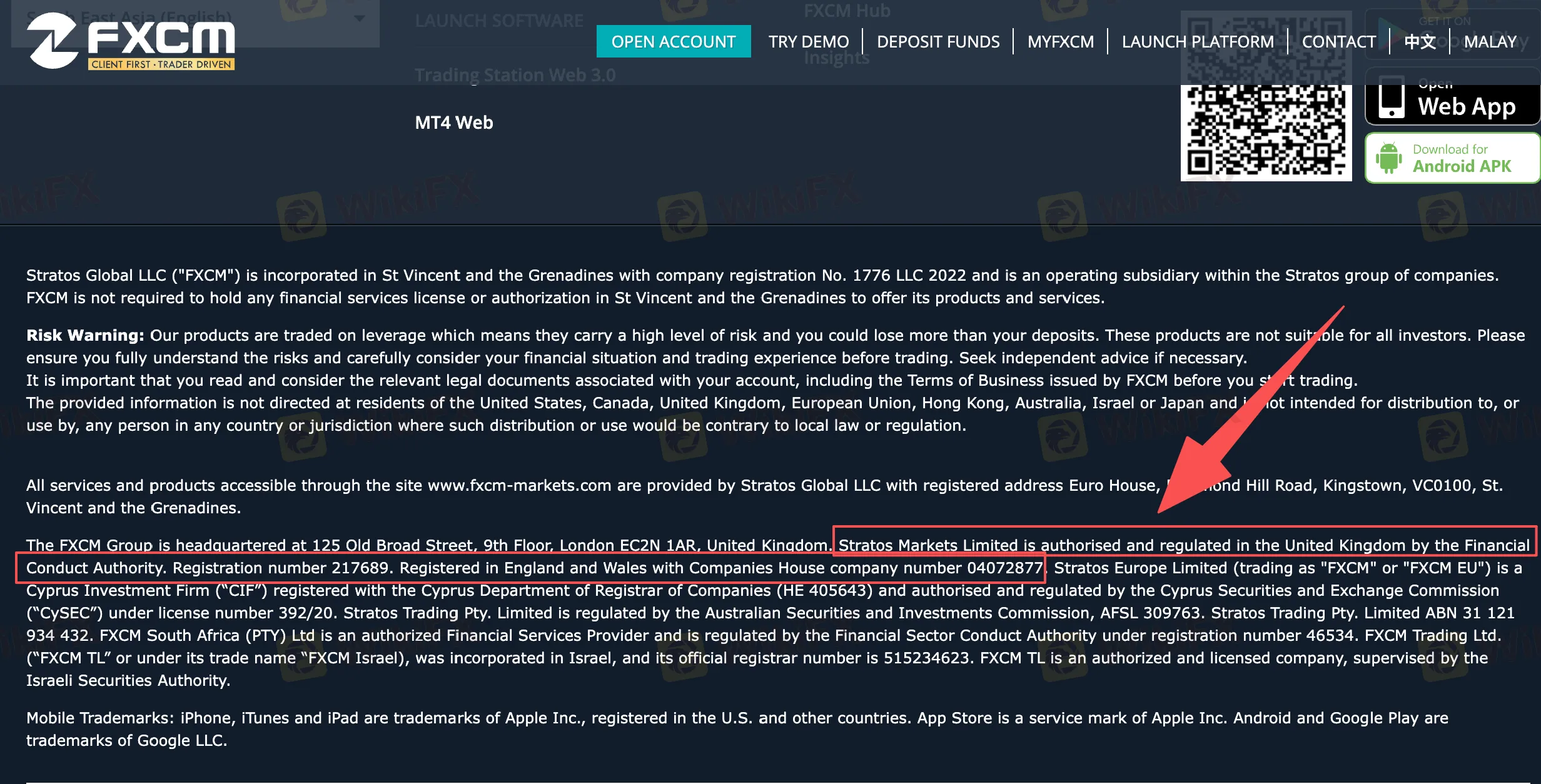
(Insert Screenshot 1: FXCM footer with entity name, FRN 217689, company number, and UK domains)
Step 2 — Go to the official FCA site
Open fca.org.uk. From the top menu, choose Consumers → FCA Firm Checker.
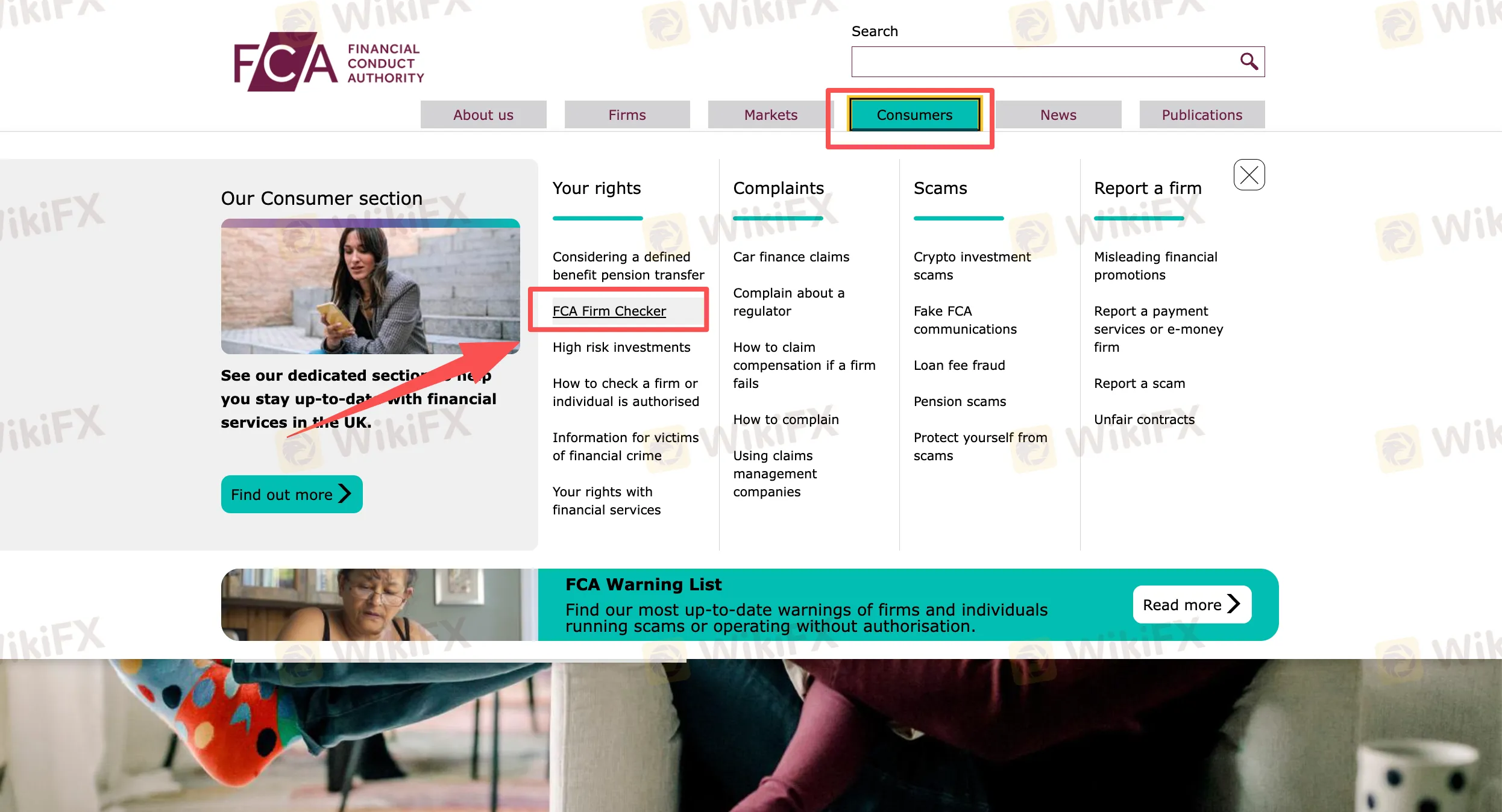
(Insert Screenshot 2: FCA homepage with Consumers → FCA Firm Checker highlighted)
Step 3 — Search and choose the firm; then view permissions
In the search box, enter the legal name you captured (e.g., Stratos Markets) and select the exact match. Use View permissions to see what the firm is authorised to do.
Tip: Permissions are product-specific. If you pick an unrelated product (e.g., bank accounts) and see “No permissions,” that‘s normal for a trading firm; you’re looking for permissions relevant to investment services/CFDs.
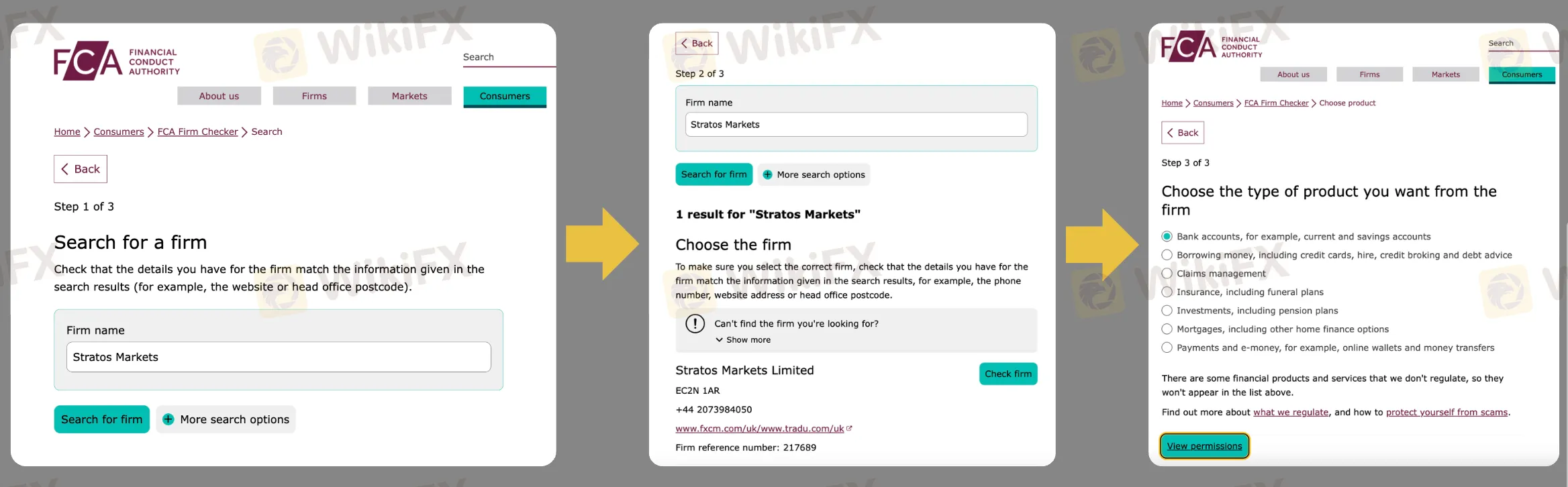
(Insert Screenshot 3: Search → choose firm → View permissions flow, with callouts on name match, FRN, domains)
Step 4 — Open the firm page and match the details
On the firm page for Stratos Markets Limited, confirm:
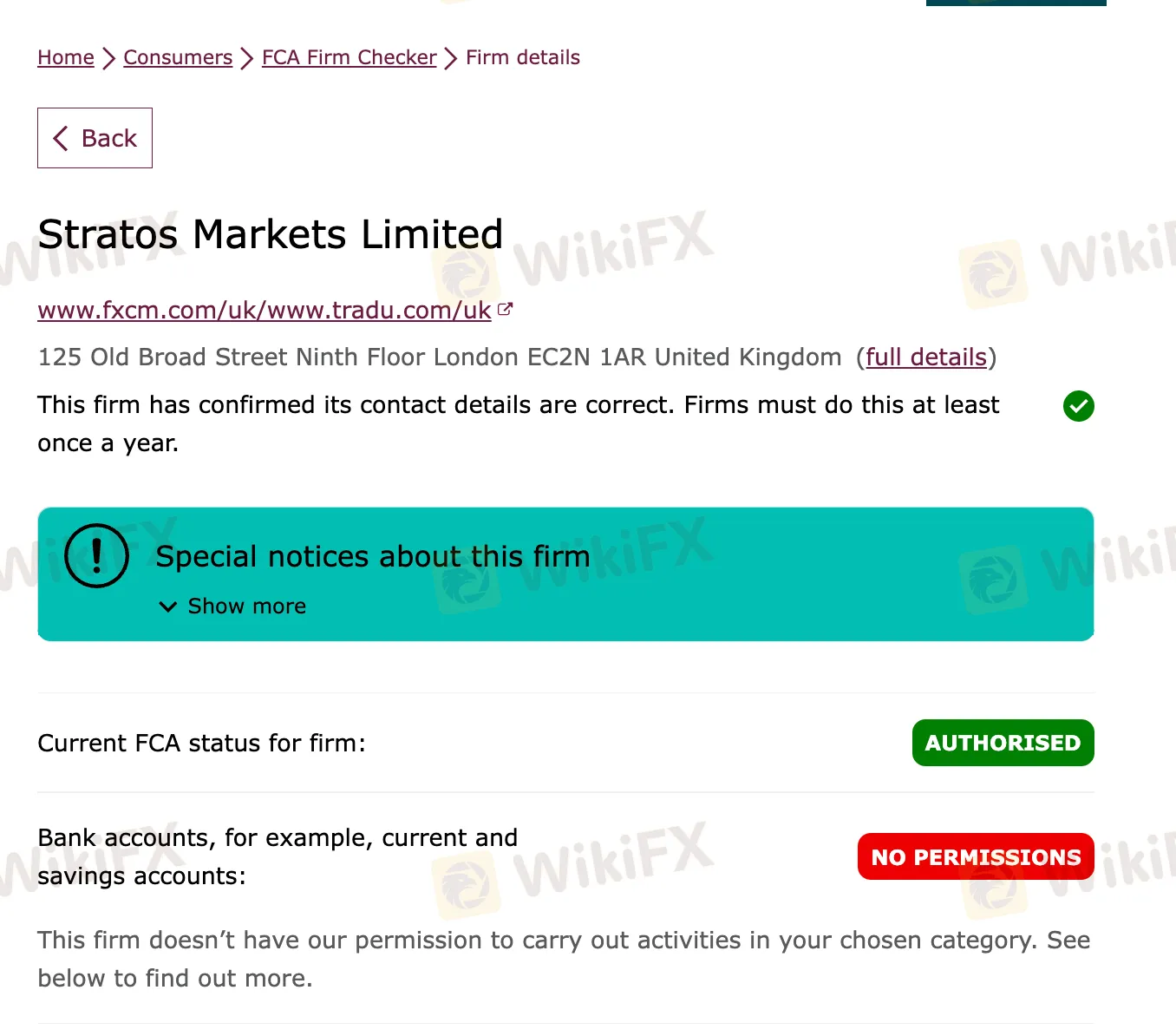
(Insert Screenshot 4: Firm details page showing “Authorised,” FRN, domains, notices)
What to confirm before you fund
When you want the same validation with less digging, WikiFX provides a trader-friendly view of regulators and firms.
A) Browse all FCA-authorised brokers
Open the FCA regulator hub on WikiFX to see the roster of FCA-authorised members and jump into any profile in one click.
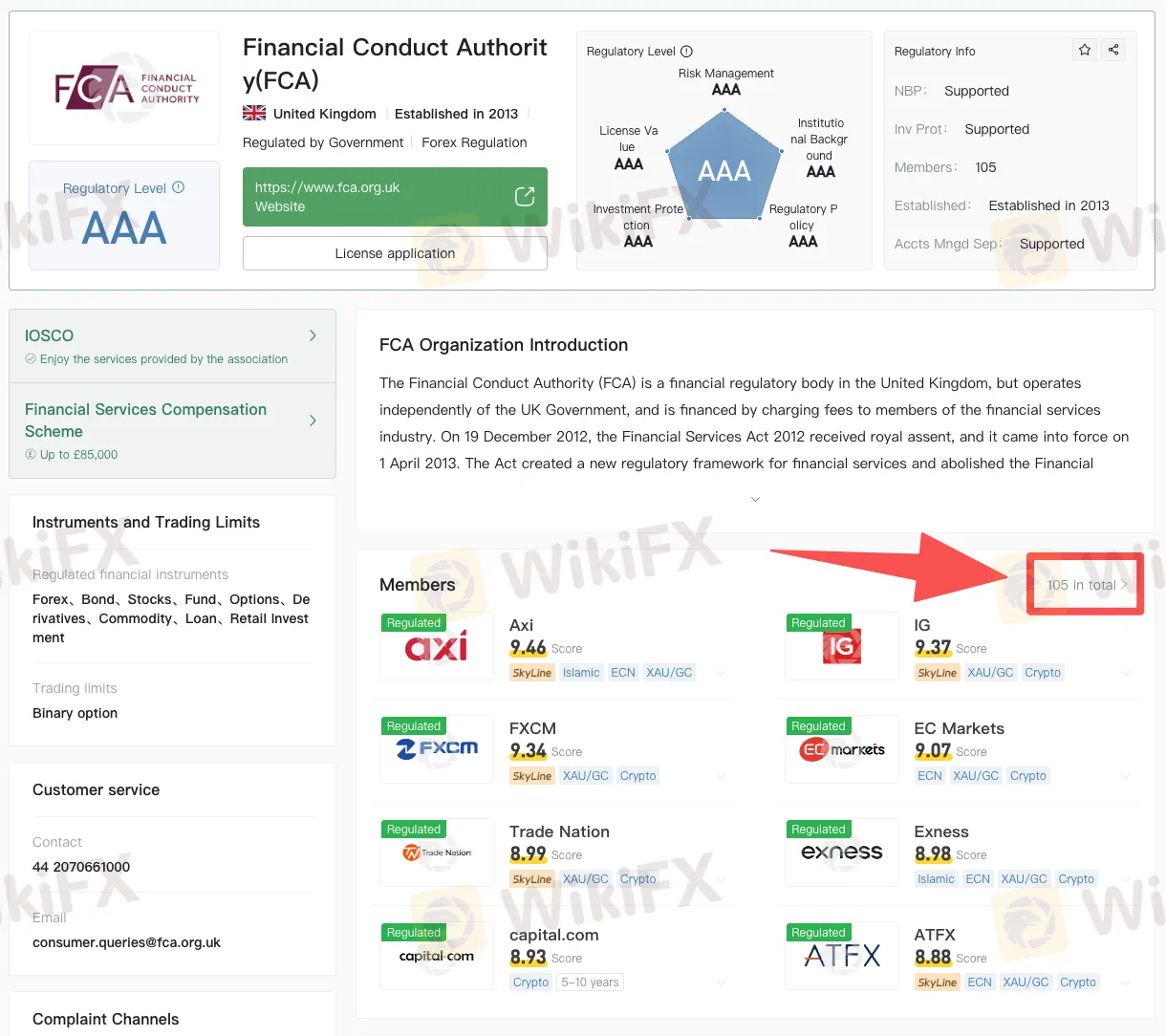
(Insert Image A: WikiFX FCA regulator page with total members highlighted)
B) Open FXCMs full licence stack
Search “FXCM” on WikiFX and open the profile. Tap Licenses to view every licence and status across jurisdictions (FCA, ASIC, CySEC, ISA, etc.), licence type (MM/STP), numbers, and current/expired flags.
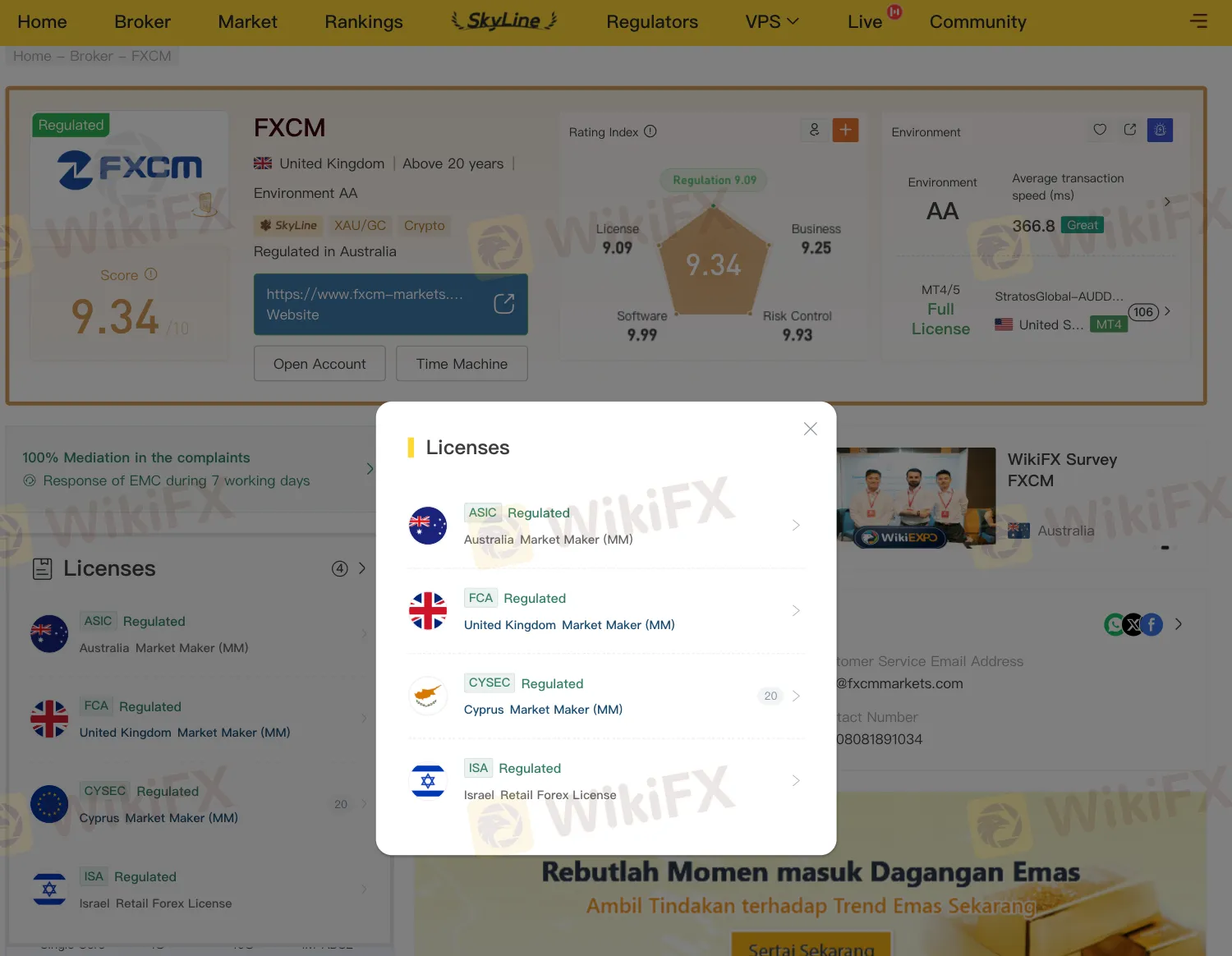
(Insert Image B: WikiFX → FXCM profile → Licenses pop-up showing FCA + other regulators)
Why this helps
In the fast-paced world of forex and CFD trading, skipping due diligence on a broker‘s authorisation can turn a promising opportunity into a costly lesson. While the FCA register remains the gold standard for irrefutable proof, WikiFXstreamlines the process into a trader-friendly toolkit that surfaces cross-border risks—mapping licences/FRNs, domains, and status flags in one view, alongside real-world insights from verified users and field reports. Whether you’re vetting a single broker or building a shortlist, start your next check on WikiFX today: it‘s not just verification, it’s vigilance.
Disclaimer:
The views in this article only represent the author's personal views, and do not constitute investment advice on this platform. This platform does not guarantee the accuracy, completeness and timeliness of the information in the article, and will not be liable for any loss caused by the use of or reliance on the information in the article.

As of December 1, 2025, a total of 105 companies in the United Kingdom held CFD licences.
The UK Financial Conduct Authority (FCA) has initiated a crackdown on illegal financial promotions by finfluencers on social media, issuing 120 account takedown requests and identifying over 1,200 illegal financial adverts that reached millions of UK accounts. This move is part of a broader international effort involving 17 global regulators.
The UK FCA has warned against Market Master Pros / MarketMasterPros, while WikiFX shows a low score and no valid regulation, adding to investor risk concerns.
The UK is tightening incident reporting rules for CFD brokers and other financial firms, with new requirements focused on cyber risks, outages, and third-party dependencies.
WikiFXWikiFXWikiFXWikiFXWikiFXWikiFXWikiFXWikiFXWikiFXWikiFX